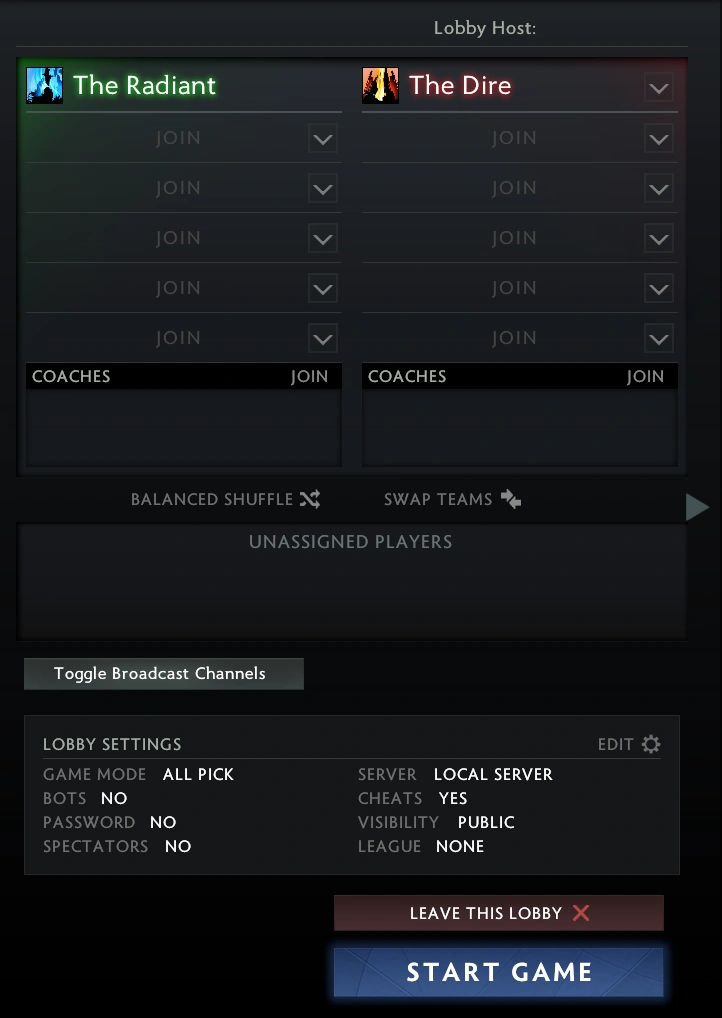
The lobby screen
A lobby can be used to play a private match with specific people. Lobby matches do not count towards a player's stats, and do not give Trophy Points or item drops. Players can find open lobbies via password; lobbies that have no password can be freely accessed by friends or guild-mates. Lobbies can be created and accessed within the PLAY tab.
Creation
Lobby password and other options can be set at any point during lobby creation. Players can join the lobby if they know the password; if no password is set, the lobby can be found through being friends or a guild.
Lobby functions
Upon joining a lobby, players can join either Radiant or Dire, or a broadcaster slot. A team identity may be applied to either team, and bots of any difficulty may be added to player slots. Teams may be swapped or automatically balanced.


Broadcaster Channels
Players in a broadcaster channel will join the game as a spectator. The game cannot be set to LAN connection, and must be a server host. There will be no time delay. Broadcasters can chat with players. If players spectate the game through normal means, they may opt to tune in to one of the broadcasters. Broadcasters can rename their channel and set a country flag icon. There are six broadcaster channels, each able to hold up to 4 broadcasters.
Lobby options
Basic options
A game mode, server location, lobby name and lobby visibility can be specified, along with a lobby password.
Competitive options
- Starting team: specify which team has first pick in Captain's Mode. Default: Random
- Penalty: subtract bonus time for either team's picking time in Captain's Mode. Default: None
- Series type: select from best of 3, best of 5, and no series. Playing with a series, each team's wins can be specified and will appear next to the game clock. Default: No series.
Gameplay options
- All Chat: voice chat is heard by both teams. Default: on.
- Version: select Tournament or Latest version (Since Dota 2 Reborn was updated, this option are no longer available). Default: Tournament.
- Spectators: enabled or disabled. Default: disabled.
- Dota TV delay: 10 seconds, 2 minutes, 5 minutes or 15 minutes. This is the amount of delay between spectators (not broadcasters) and the actual game. Default: 2 minutes.
Spectator options
- Fill empty slots with bots: Default: off.
- Bot difficulties.
- Bot Script. Default: Default bot.
Cheats
- Enable cheats: enables cheat commands such as free gold, instant respawn, create hero, etc. Default: off
- Server must be set to Local Host in order for cheats to work.
See also
| |||||||||||||||||||||||